Open-source core
Admin dashboard and status page
Watch listeners live and over time, change song titles and fallbacks, and move, disconnect or ban listeners from the built-in web dashboard.
Every Lurcast server has two built-in web pages: a public status page for listeners and an admin dashboard for you. Both come with the binary and need no setup.
Public status page#
Open / on your server, for example https://radio.example/. Icecast's /status.xsl address shows the same page, so old links keep working.
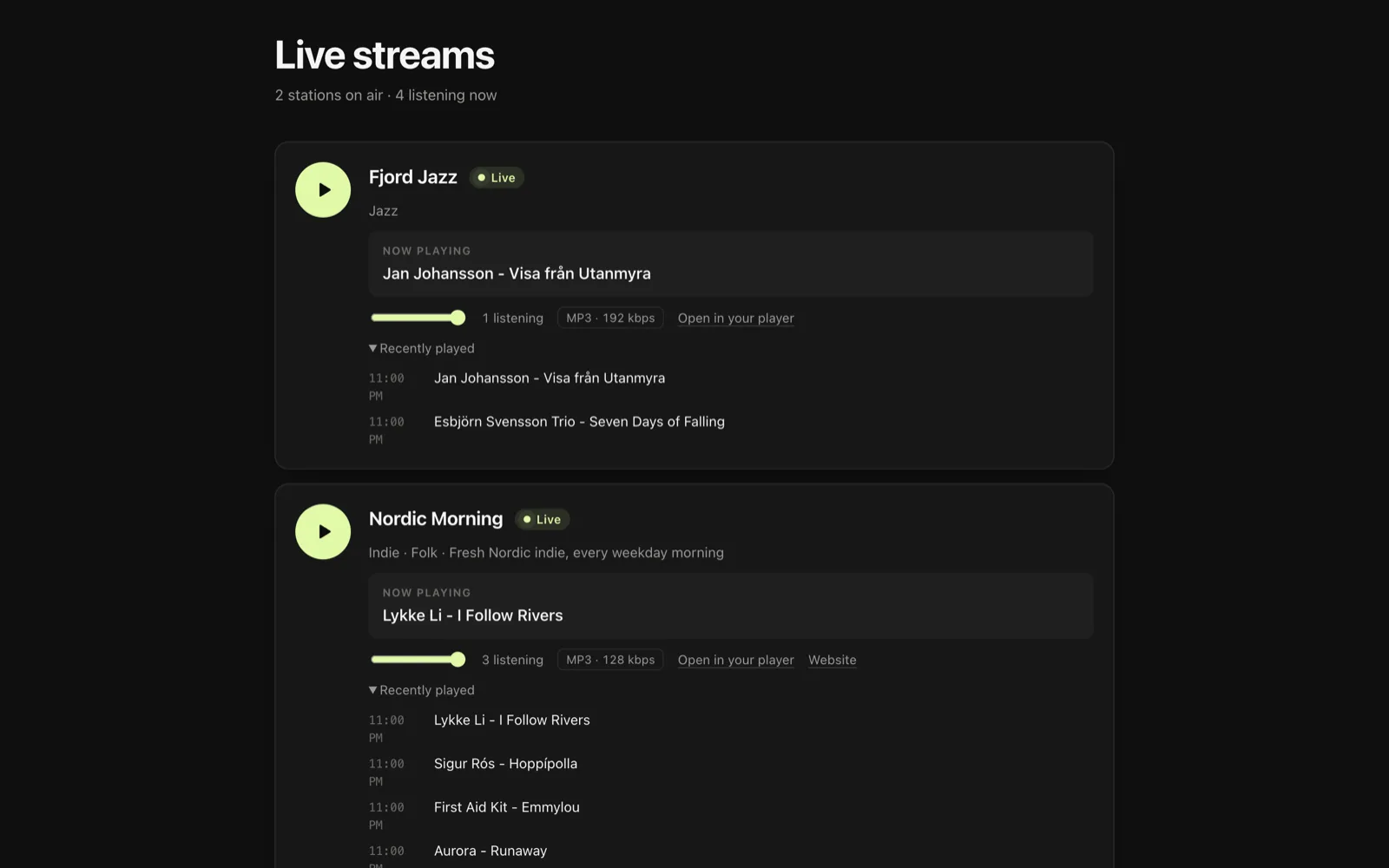
It lists every station that is not hidden, with:
- a play button and volume control
- the current song, updated every 15 seconds
- how many people are listening, and the stream format
- a link to open the stream in a desktop player (
.m3u), and the station's website if the encoder sends one - the songs played recently, in the visitor's local time
The page follows the visitor's light or dark setting and works without JavaScript. To keep a mount off it, set hidden: true for that mount in the configuration.
SHOUTcast's song history page, /played.html?sid=1, uses the same design.
Admin dashboard#
Open /admin/, for example https://radio.example/admin/, and sign in as admin with the admin_password from your configuration. In the Hosting edition, your customers sign in here too and see only their own station; see Customer logins.
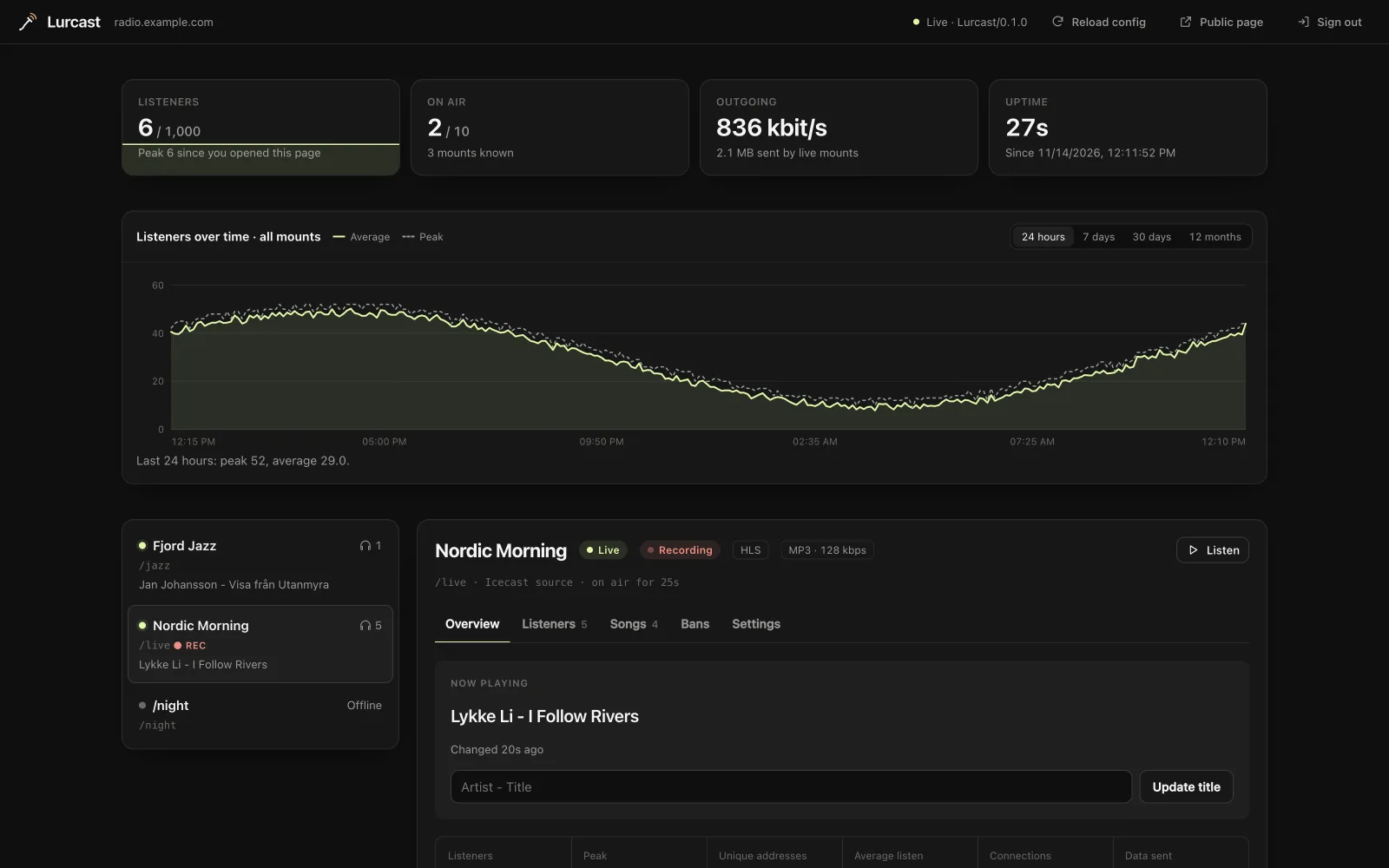
The dashboard updates every 3 seconds. At the top it shows the whole server:
- Listeners: how many are connected now, against
max_listeners, with a graph of the last few minutes - On air: live stations, against
max_sources - Outgoing: the bandwidth the server is sending to listeners
- Uptime: how long the server has been running
Under these, Listeners over time charts the average and peak number of listeners across all mounts for the last 24 hours, 7 days, 30 days or 12 months. Hover over the chart to read a period. Gaps are times when the server was not running. See Listener history for how the history is kept.
A yellow banner appears while any of admin_password, source_password or relay_password is still the default.
Reload config in the top bar applies changes to config.yml without a restart; see Operations. In the Hosting edition, a Listener locations panel under the mount list shows which countries your listeners are in; see Listener locations.
On the left is every mount: the ones live now, the ones in your configuration and your relays, with their listener counts and current songs. Select one to see its details in five tabs.
Overview#
- The current song, and a field to change it. Encoders that send titles overwrite it with their next song.
- Listeners against the mount's limit, the peak, unique addresses, average listening time, total connections, data sent, and the stream format.
- Encoder settings: the server, port, mount and username to enter in an encoder. Copy each with one click. The password is never shown.
- Listen links: the stream URL, the
.m3uplaylist, the SHOUTcast address if the mount has a stream ID, the HLS playlist if HLS is on, and the fallback. - Listeners over time: the same chart as at the top, for this mount only.
- Where listeners are: the countries of the mount's listeners (Hosting edition).
Listeners#
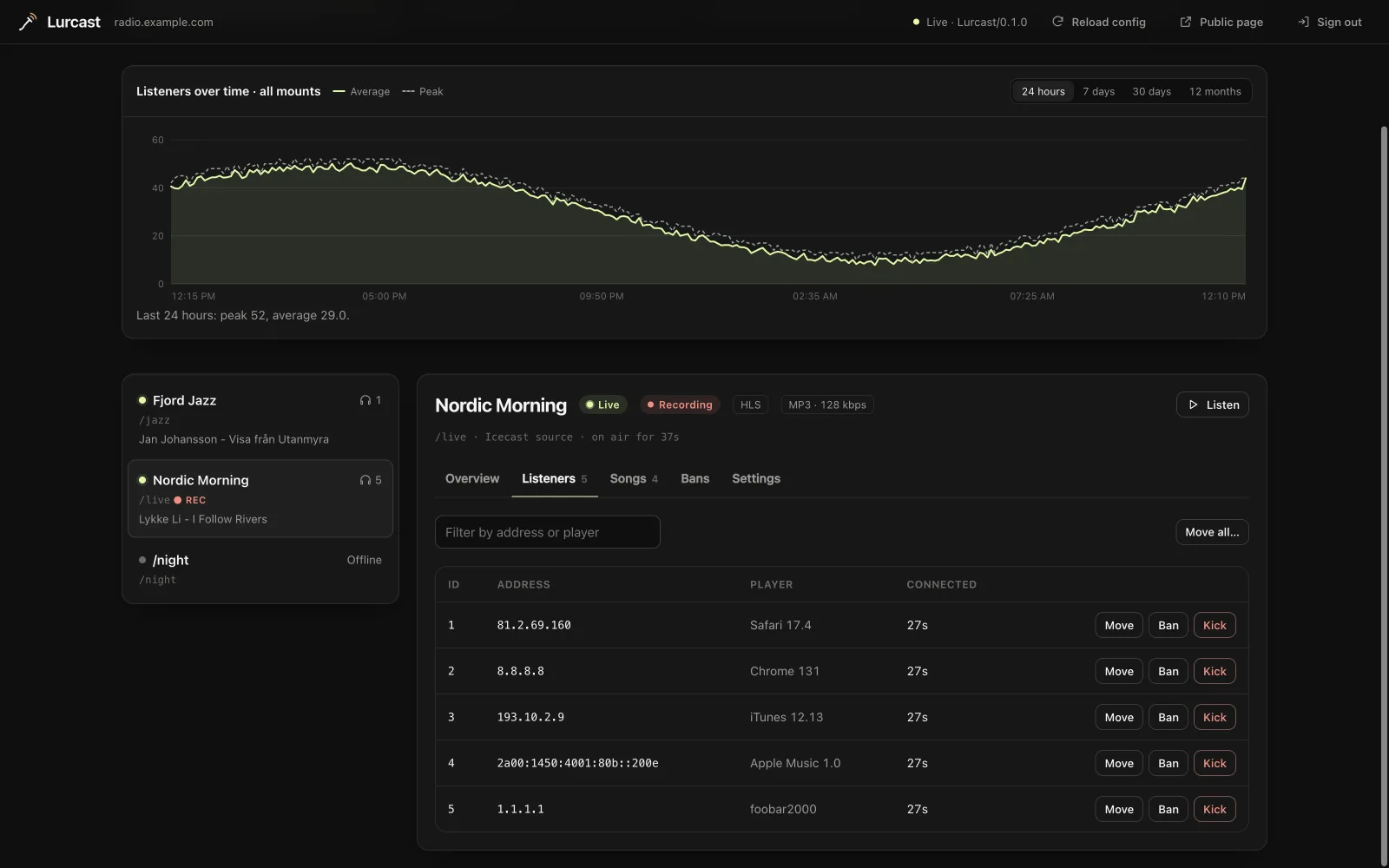
Every connected listener, with their address, player and how long they have been connected. Filter the list by address or player. For each listener you can:
- Move: switch them to another live mount with the same stream format, without disconnecting them.
- Ban: disconnect them and refuse them from now on, by their address or by their player, on this mount or every mount, for an hour, a day, 7 or 30 days, or until you lift the ban.
- Kick: disconnect them. They can connect again straight away.
Move all moves every listener on the mount at once, for example before you take a stream down.
Songs#
The songs played on the mount, newest first. The server keeps the last song_history_size songs (10 by default).
Bans#
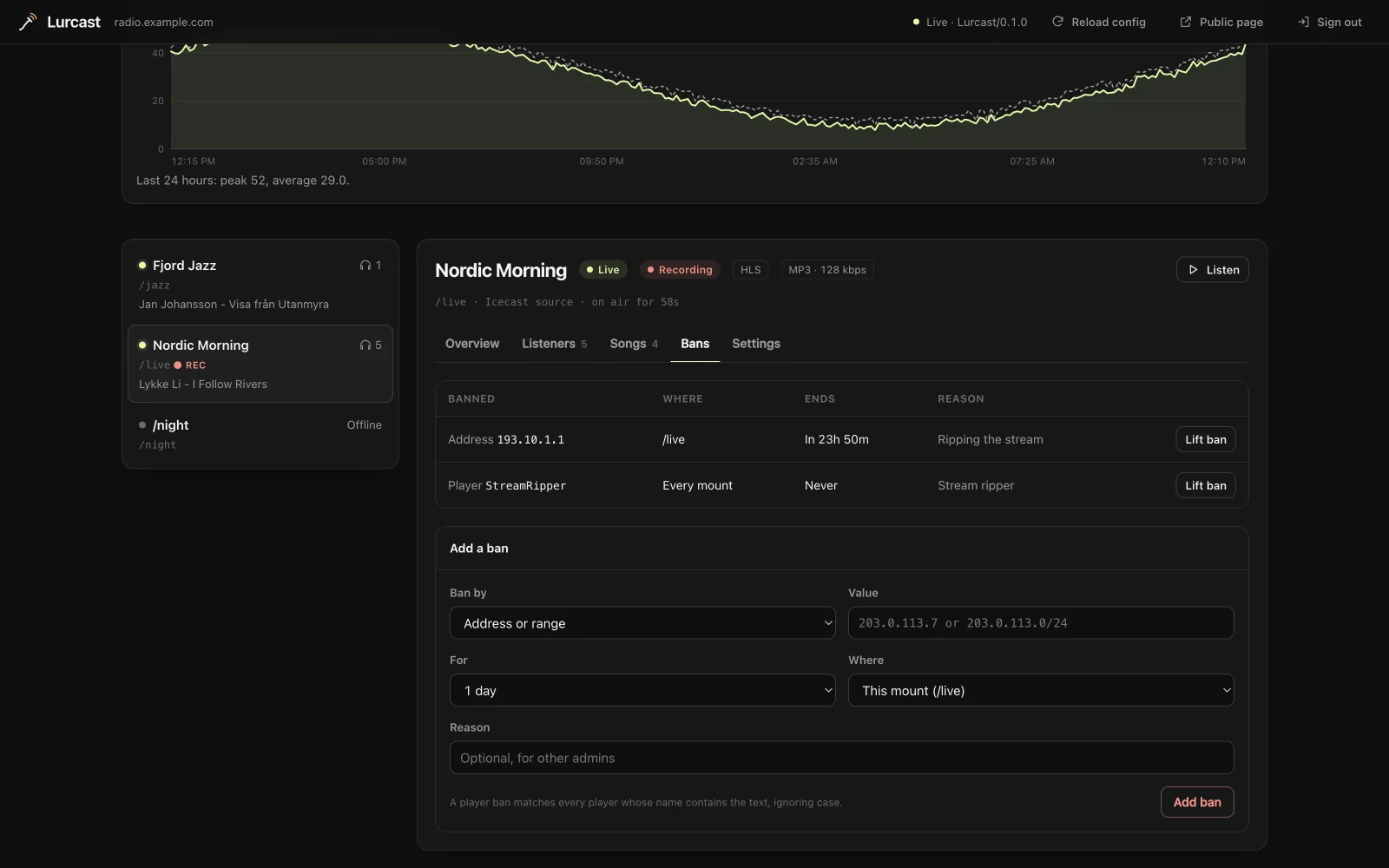
The bans that apply to this mount, with what is banned, where, when the ban ends and the reason. Lift ban removes one. Below the list you can add a ban by hand:
- Address or range: an IPv4 or IPv6 address, such as
203.0.113.7, or a range, such as203.0.113.0/24. - Player: text in the player's name (its User-Agent), such as
StreamRipper. Every player whose name contains it is banned, whatever the case.
Banned listeners are disconnected at once and get an error when they try the stream or its HLS playlist again. Bans are kept across restarts when data_dir is set; see Bans.
Settings#
- Station details: change the name, genre, website and description, and whether the station is listed in public directories. The encoder's own values return when it reconnects.
- Fallback: choose where listeners go when the source disconnects, or remove the fallback. A fallback set here lasts until the server restarts; one from
config.ymlapplies again after you remove it. - Recording: start or stop recording the mount, and download its recordings. Needs
recordings_dir; see Operations. - Disconnect the source: cut off the encoder connected to this mount. Its listeners move to the fallback if there is one. Most encoders reconnect by themselves.
Signing in and security#
- The server admin signs in as
admin. Source passwords do not give access to the dashboard. - The dashboard remembers your sign-in for the browser tab. Tick Keep me signed in on this device to stay signed in after closing it; Sign out in the top bar forgets it.
- The browser never saves the admin password for other sites to reuse. Admin actions started from a form, link or image on another website are refused.
- Serve the dashboard over HTTPS (
tls_port, or a reverse proxy), because the password travels with every request. If you can, allow/admin/only from addresses you trust at your firewall or proxy.
Customer logins#
In the Hosting edition, each station can have its own dashboard login: the station ID as the username and a dashboard password you set through the API or WHMCS. Your customer then sees the same dashboard, limited to their station:
- only their own mount, with its listeners, chart, song history, bans, recordings and settings
- no other stations, no server-wide chart, and no Reload config
- bans only for their own mount
The server checks the limit on every request, including the Icecast admin endpoints, so a customer cannot reach other stations through the API either. Suspended stations cannot sign in.
The same data as JSON#
Everything the dashboard shows comes from one endpoint, which you can use in your own scripts:
curl --user admin:change-me-admin https://radio.example/admin/api/overview
It returns the server totals and every mount with its station details, current song, history and listener count. Add ?clients=/live to include that mount's listener list, which the dashboard does only while its Listeners tab is open, so polling stays light on busy servers. The dashboard's actions use the Icecast-compatible admin endpoints, so anything you can do in the dashboard you can also script.
Paths the pages use#
The pages load their stylesheet and scripts from /_lurcast/, so that path cannot be a mount name. Listen links use public_url; if you leave it out, Lurcast uses http://<hostname>:<port>. Set it to the address listeners reach, such as https://radio.example, when the server is behind a proxy or uses TLS.