Open-source core
Operations
Reload the configuration without a restart, keep an access log, offer HLS, record mounts to disk, send webhooks, chart listener history and ban listeners.
All of this is in the open-source server. Each feature is off until you configure it, except reloading, which always works.
Reload the configuration#
Change config.yml, then do one of these:
systemctl reload lurcastwith the bundled systemd unit, orkill -HUP <pid>- press Reload config in the admin dashboard
- call the API:
curl -X POST --user admin:change-me-admin https://radio.example/admin/reload
Lurcast reads the file again and applies it while it keeps streaming. Listeners and sources stay connected. The reload covers:
- passwords, limits, mounts and fallbacks
- relays, which are started, changed or stopped as needed
- webhooks, the access log and the log level (and the Hosting edition's location database)
- the TLS certificate, so a renewed Let's Encrypt certificate takes effect without dropping anyone
Fallbacks you changed in the dashboard are replaced by the ones in the file.
If the new file has a mistake, nothing changes: the running configuration stays, and the error is logged and shown in the dashboard. host, the ports and the master relay settings need a restart; the reload lists any of those that changed.
Access log#
access_log: /var/log/lurcast/access.log # or "-" for standard output
Each request becomes one line in the combined log format, the same as Icecast's, so log analysers and statistics tools can read it. The last field is how long the request took, in seconds:
203.0.113.7 - - [13/Nov/2026:22:01:14 +0000] "GET /live HTTP/1.1" 200 1843200 "-" "VLC/3.0.20" 115
- Listeners are logged when they disconnect, with the bytes they received and how long they listened.
- Passwords in query strings (
pass=,password=) are replaced with*****. - A reload reopens the file, so
logrotatecan move it away and then runsystemctl reload lurcast.
The bundled systemd unit gives the service a writable /var/log/lurcast.
HLS#
hls: true
hls_segment_seconds: 6   # length of each segment
hls_window: 6            # segments in the playlist
Every MP3 and AAC mount then also has an HLS playlist at the mount path plus .m3u8, for example https://radio.example/live.m3u8. Safari, iPhones, Android and players built on hls.js can play it, and it copes with networks where long-running streams get cut off.
- Lurcast cuts the audio into segments on frame boundaries. It does not transcode, so the quality is exactly what your encoder sends.
- Segments carry the song title, so players that read ID3 tags show it.
- To enable HLS on some mounts only, leave
hlsoff and sethls: trueon those mounts undermounts. Turn it off for one mount the same way. - Ogg, Opus and AAC sent as LATM are not offered over HLS.
- The dashboard counts HLS listeners as the addresses that fetched a segment in the last few segment lengths.
- HLS requests bypass listener authentication and listener limits. HLS therefore stays off while
auth_urlis set.
Recording#
recordings_dir: /var/lib/lurcast/recordings
record_split_minutes: 60      # a new file every hour; 0 = one file per connection
mounts:
  /live:
    record: true              # record every time the source connects
Recordings are saved as <recordings_dir>/<mount>/<start time in UTC>.<format>, for example live/2026-11-13_22-00-00.mp3. They contain the audio exactly as the source sends it.
You can also record any mount on demand, without record: true:
- In the dashboard: open the mount, then Settings → Start recording. Stop recording ends it. A recording started this way also stops when the source disconnects.
- With the API:
POST /admin/record?mount=/live&action=startandaction=stop, with admin credentials.
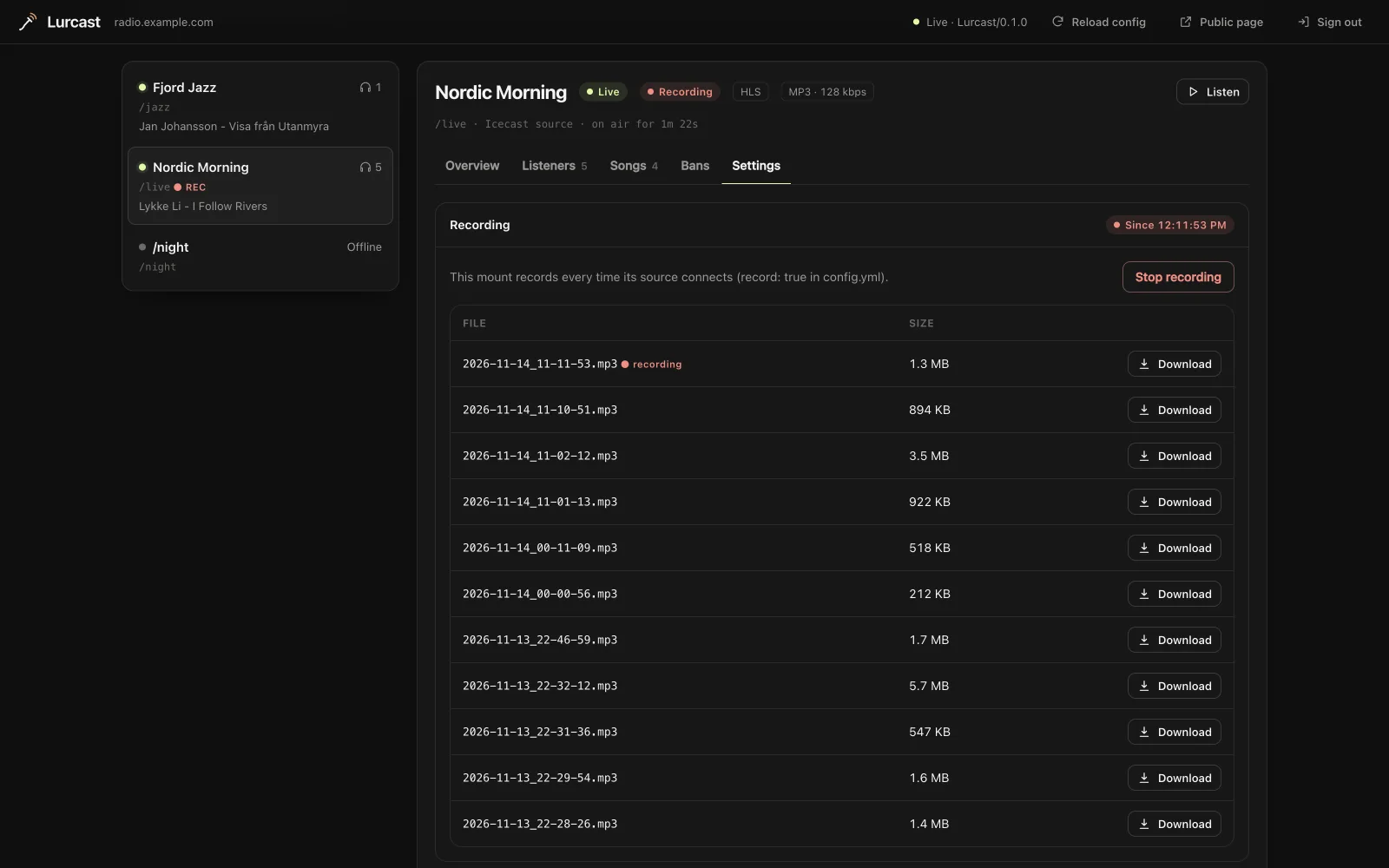
The same tab lists the mount's recordings, newest first, with a download button for each. Scripts can list them with GET /admin/api/recordings?mount=/live.
- MP3 and AAC files are split on frame boundaries, so every part plays on its own. Ogg recordings are never split, because each part would need the stream headers again.
- Lurcast never deletes recordings. Remove old ones with a cron job or a
systemd-tmpfilesrule. - When a file is finished, Lurcast sends the
recording.finishedwebhook, for example to upload it to an archive.
Webhooks#
Webhooks tell your own systems when something happens on the server.
webhooks:
  - url: https://example.com/hooks/lurcast
    secret: a-long-random-string     # optional, signs every request
    events: [source.connected, source.disconnected, song.changed, recording.finished]
webhook_timeout: 5
| Event | Sent when | Data |
|---|---|---|
source.connected |
An encoder or relay goes live. | mount, protocol, content_type, bitrate, name, genre |
source.disconnected |
It stops. | mount, duration_seconds, peak_listeners |
song.changed |
The title changes. | mount, song, listeners |
listener.connected |
A listener tunes in. | mount, id, address, user_agent, country |
listener.disconnected |
They leave. | the same, plus duration_seconds and bytes_sent |
recording.finished |
A recording file is complete. | mount, path, file, bytes, started_at, duration_seconds |
config.reloaded |
The configuration was reloaded. | restart_required |
Without events, a webhook gets every event except the two listener ones, which can be very frequent on a busy server.
Each event is a JSON POST:
{
  "event": "song.changed",
  "id": "5c1fa9e2d0b47e3a6f1c8d24",
  "at": "2026-11-13T22:01:14Z",
  "server": "https://radio.example",
  "data": {"mount": "/live", "song": "Artist - Title", "listeners": 42}
}
The request also carries:
X-Lurcast-Event: the event nameX-Lurcast-Delivery: the same value asid, so you can ignore duplicatesX-Lurcast-Signature: sha256=<hex>, when a secret is set: the HMAC-SHA256 of the raw request body, keyed with the secret
Check the signature before you trust a request. For example, in Node.js:
const crypto = require("node:crypto");
const expected = Buffer.from("sha256=" + crypto.createHmac("sha256", secret).update(rawBody).digest("hex"));
const received = Buffer.from(req.headers["x-lurcast-signature"] || "");
const valid = received.length === expected.length && crypto.timingSafeEqual(received, expected);
Answer with any 2xx status. A delivery that gets no answer or another status is tried again after 2 seconds and again after 10. Each webhook has its own queue, so a slow receiver never holds up streaming.
Listener history#
Lurcast counts the listeners on every mount once a minute, HLS listeners included, and keeps the average and the peak:
- per 5 minutes for the last 2 days
- per hour for the last 35 days
- per day for the last 2 years
The dashboard charts them for the server and for each mount. To keep the history across restarts, set data_dir (see Keeping state). Your own tools can read it as JSON:
curl --user admin:change-me-admin 'https://radio.example/admin/api/history?mount=/live&range=week'
range is day, week, month or year; leave out mount for the whole server. Each point is [unix time, average, peak], with nulls for periods when the server was not running.
Bans#
Ban listeners from the dashboard, or with the admin API:
# An address range on every mount, for a day
curl --user admin:change-me-admin -X POST \
  'https://radio.example/admin/bans?kind=address&value=203.0.113.0/24&minutes=1440&reason=ripping'

# A player on one mount, until lifted
curl --user admin:change-me-admin -X POST \
  'https://radio.example/admin/bans?kind=user_agent&value=StreamRipper&mount=/live'

# List bans, and lift one
curl --user admin:change-me-admin 'https://radio.example/admin/api/bans'
curl --user admin:change-me-admin -X POST 'https://radio.example/admin/bans/remove?id=<id>'
kind=addresstakes an IPv4 or IPv6 address or range. Ranges wider than/8(IPv4) or/16(IPv6) are refused, so a typo cannot lock everyone out.kind=user_agentmatches every player whose User-Agent contains the text, ignoring case. It needs at least 3 characters.- Without
mount, the ban applies to every mount. Withoutminutes, it lasts until you lift it.
Matching listeners are disconnected straight away and refused on the stream and its HLS playlist. Bans apply to listeners only, never to the dashboard or sources. Behind a reverse proxy, set trusted_proxies so bans see the listener's real address.
Keeping state#
data_dir: /var/lib/lurcast
With data_dir set, Lurcast keeps the ban list in bans.json and the listener history in listener-history.bin there, so both survive restarts. bans.json is plain JSON; edit it and reload to change bans by hand. Without data_dir, both live in memory until the server stops. The Docker image sets data_dir to /var/lib/lurcast, so mount a volume there. Changing data_dir needs a restart.
Behind a reverse proxy#
If nginx, Caddy or a CDN sits in front of Lurcast, every listener seems to come from the proxy, in the dashboard, webhooks and the access log. List your proxies so Lurcast takes the real address from X-Forwarded-For:
trusted_proxies: [127.0.0.1, "::1", 10.0.0.0/8]
Only requests from those addresses are believed, so listeners cannot fake their address by sending the header themselves. The real address is then used in the dashboard, webhooks, listener authentication and the access log, and for listener locations in the Hosting edition. Connection and rate limits still apply to the address that actually connects.