Open-source core
Plugins
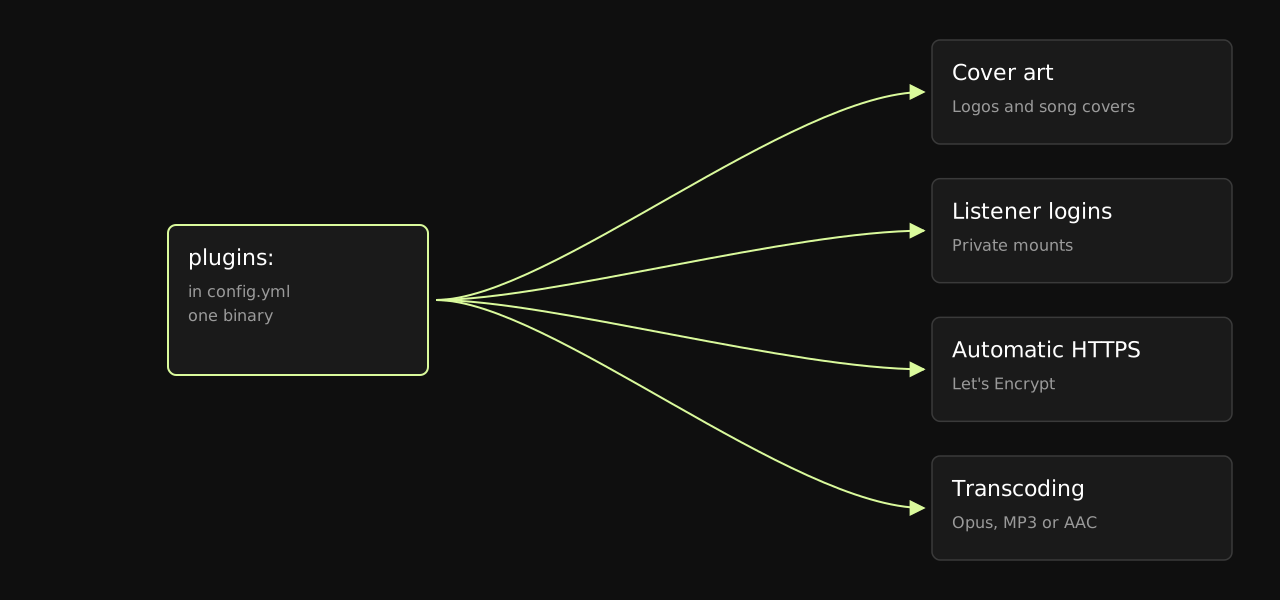
The plugins built into Lurcast and set up in config.yml: cover art, private mounts with listener logins, HTTPS from Let's Encrypt and transcoding.
Some features are plugins. They are built into the same binary as the server, but kept apart from it, and each one is turned on and set up in its own section under plugins: in config.yml:
| Plugin | What it does | Off until you set it up? |
|---|---|---|
cover_art |
Station logos and song covers for players. | No, on by default. |
listener_logins |
Mounts that need a user name and password. | Yes |
acme |
HTTPS with free certificates from Let's Encrypt. | Yes |
transcode |
Copies of a mount in Opus, MP3 or AAC, for example for mobile listeners. | Yes |
hls |
HLS playlists for phones and browsers. See Operations. | Yes |
access_log |
An access log. See Operations. | Yes |
webhooks |
Events posted to your own systems. See Operations. | Yes |
url_auth |
Icecast-style URL authentication. See Configuration. | Yes |
yp |
Directory listings. See Configuration. | Yes |
- A section with
enabled: falseturns the plugin off but keeps its settings. - Unknown plugins and unknown settings are errors that name the plugin, so a typo stops the server at startup.
- A reload applies changed plugin settings, and starts plugins you turned on. If the new settings are wrong, the plugin keeps the ones it has and the error is logged.
- The dashboard shows the controls of the plugins that are on.
- Plugins that keep files put them in
data_dir/<plugin>/, for exampledata_dir/cover_art/.
Cover art#
On by default. SHOUTcast 2 encoders send the station logo and the cover of each song inside the stream. Lurcast keeps them and serves them to players:
| URL | Image |
|---|---|
/_lurcast/art/<mount> |
The song's cover, or the station logo when there is none. Add ?type=playing or ?type=station for one of them. |
/streamart?sid=1 |
The station logo, at the path the SHOUTcast 2 server uses. |
/playingart?sid=1 |
The song's cover, the same way. |
The status JSON lists the path as artwork for each mount, and /api/v1/stations as now_playing.artwork_url. Responses carry an ETag, so players can check for a new cover cheaply.
Icecast encoders can't send artwork, so upload it from the mount's Settings tab in the dashboard, or from your playout automation for every song:
# The cover of the song playing now
curl --user admin:change-me-admin -H 'Content-Type: image/jpeg' --data-binary @cover.jpg \
  'https://radio.example/admin/artwork?mount=/live&type=playing'

# The station logo
curl --user admin:change-me-admin -H 'Content-Type: image/png' --data-binary @logo.png \
  'https://radio.example/admin/artwork?mount=/live&type=station'

# Remove one
curl --user admin:change-me-admin -X POST 'https://radio.example/admin/artwork/remove?mount=/live&type=playing'
- Images are JPEG, PNG, GIF, WebP or BMP, up to 1 MB.
- With
data_dirset, station logos survive restarts. Song covers are kept in memory. - To turn it off:
plugins: {cover_art: {enabled: false}}.
Listener logins#
Makes mounts private. Listeners need a user name and password from an Apache htpasswd file. Players send them with HTTP Basic authentication, usually from a URL like https://anna:secret@radio.example/private.
plugins:
  listener_logins:
    mounts:
      /private: /etc/lurcast/private.htpasswd
      "*": /etc/lurcast/listeners.htpasswd   # optional: every other mount
    realm: My Radio                           # optional: the name players show when they ask
Manage the logins in the mount's Settings tab in the dashboard, with the API, or with the htpasswd tool. Lurcast reads the file again when it changes.
curl --user admin:change-me-admin 'https://radio.example/admin/api/listener-logins?mount=/private'
curl --user admin:change-me-admin -X POST 'https://radio.example/admin/listener-logins?mount=/private&user=anna&password=secret'
curl --user admin:change-me-admin -X POST 'https://radio.example/admin/listener-logins/remove?mount=/private&user=anna'
- Lurcast checks bcrypt, Apache MD5 (
$apr1$),{SHA}and Icecast's plain MD5 hashes, and saves new passwords with bcrypt. - Protected mounts answer
401without a valid login, on the stream and on its HLS playlist and segments. - Removing a user or changing a password doesn't disconnect players that are already listening.
Automatic HTTPS#
Gets free certificates from Let's Encrypt for your domains, serves HTTPS with them, and renews them before they expire. You need no other software, but the domains must point at the server and port 80 must be reachable from the internet, so Let's Encrypt can check them.
data_dir: /var/lib/lurcast        # required: the account key and certificate are kept here
plugins:
  acme:
    domains: [radio.example, www.radio.example]
    email: ops@radio.example      # optional: Let's Encrypt emails you about problems
    accept_terms: true            # you accept Let's Encrypt's terms of service
    https_port: 443
    http_port: 80                 # 0 when a proxy forwards /.well-known/acme-challenge/ to Lurcast
    redirect_http: false          # true sends every other request on http_port to HTTPS
    renew_days: 30                # renew this many days before expiry
Listeners then use https://radio.example/live.
- Lurcast checks the certificate at startup and every 12 hours. If it can't get one, it logs why and tries again after a minute, then waits twice as long each time, up to 6 hours. Streams on the main port keep working meanwhile.
- HTTPS starts as soon as the first certificate arrives. Renewed certificates are used for new connections without a restart.
- All domains share one certificate, up to 100. Wildcards (
*.radio.example) aren't supported, because they need DNS validation. - Use this plugin or your own certificate (
tls_port,tls_certandtls_key), not both. - Ports 80 and 443 need root or
CAP_NET_BIND_SERVICE, for exampleAmbientCapabilities=CAP_NET_BIND_SERVICEin the systemd unit. - To try it out without Let's Encrypt's rate limits, add
directory: https://acme-staging-v02.api.letsencrypt.org/directory. Moving to the real directory then gets a new certificate. - Changing the domains or ports needs a restart.
Transcoding#
Re-encodes a mount on another mount: for example a low-bitrate Opus copy of your MP3 stream for listeners on mobile data, or an MP3 copy of an Opus stream for older players.
plugins:
  transcode:
    streams:
      - source: /live            # the mount to read
        mount: /live.opus        # the mount to publish
        codec: opus              # opus, mp3 or aac (default opus)
        bitrate: 64              # kbps (default 64 for Opus, 128 for MP3 and AAC)
        channels: 2              # 1 or 2 (default 2)
      - source: /live
        mount: /live.mp3
        codec: mp3
        bitrate: 128
      - source: /live
        mount: /live-mobile.opus
        bitrate: 24
        channels: 1
| Codec | Bit rates | Output |
|---|---|---|
opus |
6 to 256 kbps | Ogg Opus, 48 kHz |
mp3 |
8, 16, 24, 32, 40, 48, 56, 64, 80, 96, 112, 128, 144, 160, 192, 224, 256 or 320 kbps | Constant bit rate MP3, 44.1 kHz from 96 kbps and a lower sample rate below that |
aac |
8 to 320 kbps, within what the profile allows | AAC in ADTS, 44.1 kHz. Needs the FDK AAC library. |
At low bit rates, Opus sounds clearly better than MP3.
- It reads MP3, Ogg Vorbis and Ogg Opus, and AAC (ADTS or LATM) when the FDK AAC library is installed. Other formats can't be transcoded: Lurcast logs a warning and doesn't publish the copy.
- The copy appears while the source mount is live, and goes away about two seconds after the source disconnects. Its listeners then move to its fallback, if it has one. A source that reconnects within those two seconds keeps the same Opus stream going.
- Song titles are copied as they change. The station name, genre, description and URL are copied when the copy starts.
- Each stream uses a few percent of one CPU core.
- A mount can be the target of one stream only, can't be its own source, and streams can't feed each other in a loop.
- A reload applies changes to the list and restarts only the streams that changed.
- MP3 is encoded with LAME, under the LGPL. Releases include it as a separate library,
lib/libmp3lame.so.0, which you may replace with your own build, and each release has LAME's source next to the downloads.
AAC with the FDK library#
Lurcast doesn't include an AAC codec. If the Fraunhofer FDK AAC library (libfdk-aac.so.2) is installed, Lurcast loads it at startup, logs that it found it, and can then transcode AAC sources, including HE-AAC, and publish AAC:
      - source: /live
        mount: /live.aac
        codec: aac
        profile: he      # lc (default), he (HE-AAC) or hev2 (HE-AAC v2, stereo only)
        bitrate: 48      # default 128 for lc, 48 for he, 32 for hev2
Without the library, a stream with codec: aac is refused when the configuration loads, with a message saying the library is missing, and AAC sources are logged as not transcodable. Everything else works as usual.
To install it:
Docker image: build your own image from ours:
FROM ghcr.io/lurcast/lurcast
USER root
RUN apk add --no-cache fdk-aac
USER lurcast
Release download: Lurcast runs with musl, so it needs a musl build of the library. Put
libfdk-aac.so.2in/opt/lurcast/lib/, for example from Alpine'sfdk-aacpackage, or on Alpine Linux install that package. A build for glibc, such as Debian's or Ubuntu'slibfdk-aac2, can't be loaded.Built from source: the system's library is used:
fdk-aacwith Homebrew,libfdk-aac2on Debian and Ubuntu.
Some distributions ship FDK with AAC-LC only; Alpine and Fedora do, because of patents. With such a build, profile: he and hev2 are refused with a message saying so. For HE-AAC, install a full build, such as one compiled from the upstream source.
FDK's license grants no patent rights. It allows its use only where you hold the patent licenses AAC needs, from Via LA or the patent holders.
AAC-LC's US patents have expired; HE-AAC's are still in force in places. Whether you may use it is up to you.
Lurcast doesn't distribute FDK, and its license gives you permission to combine the two.
Upgrading from 0.1#
Lurcast 0.2 moved these settings into plugin sections. The old top-level keys are now unknown settings, so the server won't start until you move them:
| 0.1 | 0.2 |
|---|---|
access_log: /var/log/lurcast/access.log |
plugins: {access_log: {path: /var/log/lurcast/access.log}} |
webhooks: [...] and webhook_timeout |
plugins: {webhooks: {endpoints: [...], timeout: 5}} |
auth_url, auth_header and auth_timeout |
plugins: {url_auth: {url: ..., header: ..., timeout: 5}} |
yp_urls, yp_timeout and yp_touch_interval |
plugins: {yp: {urls: [...], timeout: 15, touch_interval: 60}} |
hls: true, hls_segment_seconds and hls_window |
plugins: {hls: {segment_seconds: 6, window: 6}} |
hls: on a mount |
mounts: [...] or except: [...] under plugins.hls |
The environment variables LURCAST_AUTH_URL, LURCAST_ACCESS_LOG and LURCAST_HLS are gone too.
Writing your own#
A plugin is a Crystal class in src/plugins/ of the source code. It declares its settings and its URLs, and gets the server's events, such as a source connecting or the song changing. Build Lurcast from source to include it. The README explains how, with an example.